TL;DR
For international clients, receiving photos via a "client gallery" is the expected norm. By setting the gallery language to their native tongue, you leave a lasting impression of being cared for—without needing lengthy explanations.
Why do clients prefer a "gallery link"?
When clients receive their photos, they almost always open them on their phones first.
With ZIP files or cloud folder links, there are extra steps: "Download → Unzip → Search in folder".
In contrast, a gallery link starts the view, select, and download flow the moment they open it.
This creates a seamless experience that requires little to no explanation.
Especially for clients in the US and Europe, this gallery method is the standard for wedding, portrait, and family photography. They adapt to it instantly.
But regardless of the region, once anyone experiences this flow, they find it incredibly convenient.
The small detail that wins international clients over

Even with the same gallery link, how the client feels can vary.
The difference comes down to a very small, thoughtful detail:
"Sending it in their native language."
As soon as clients open the gallery, they scan the menus, buttons, and instructions.
When these are in their native language:
- They feel welcomed and accommodated.
- They instantly understand what to do.
- They ask fewer questions.
This isn't about perfect translation—it's an attitude of "saving the client's time."
The Goal: Less explaining, a friendlier experience
When delivering to international clients, we usually want three things:
- Clients open it immediately.
- Clients select photos immediately.
- Clients save them immediately.
The more you have to explain, the more time zone differences drag out the conversation and delay your schedule.
A gallery with their native language setting noticeably reduces that friction.
How to do this in Pixpics (It's really simple)
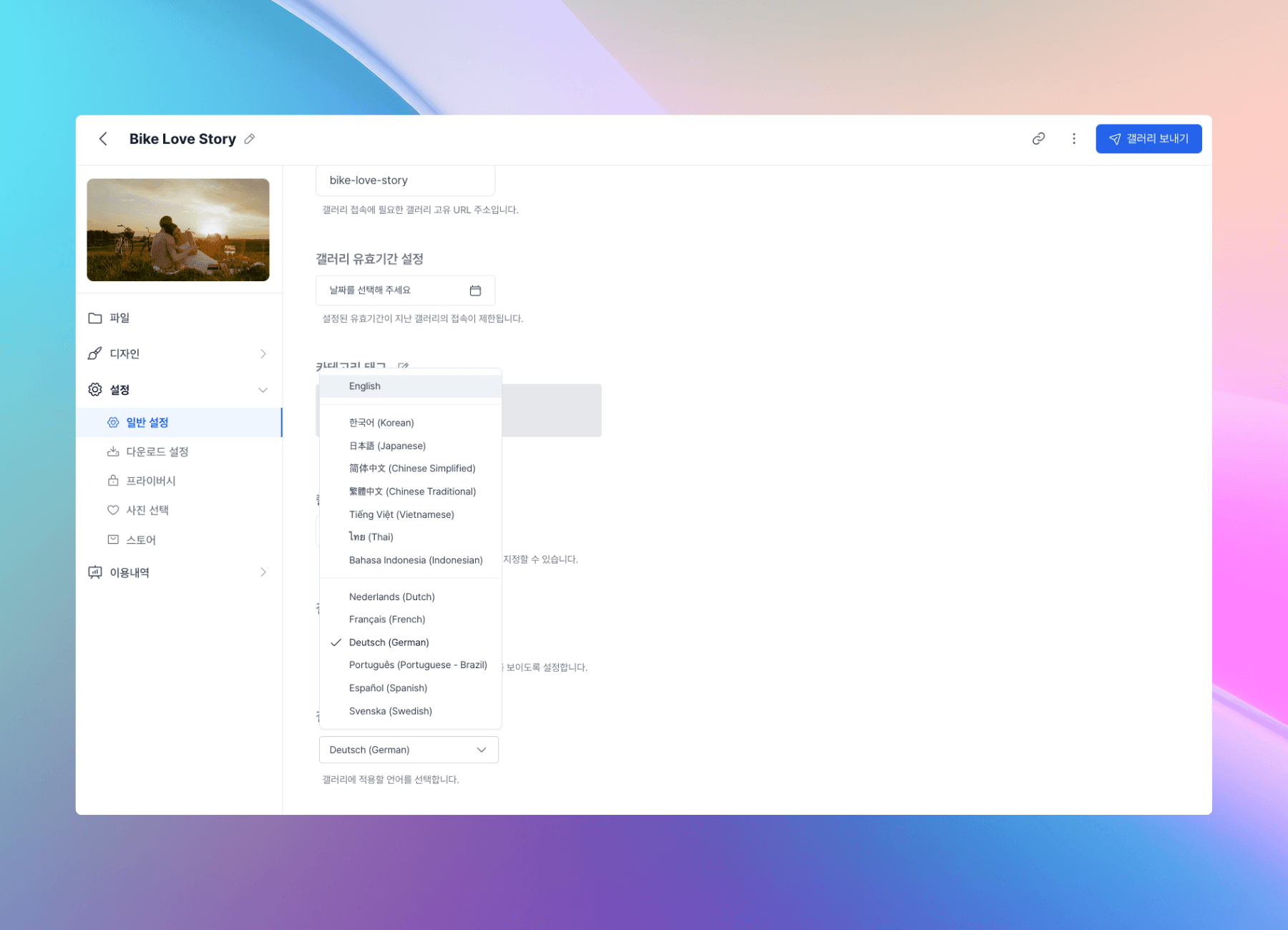
- Create a gallery and upload the files.
- In the gallery settings, change the language to the client's language.
- Send the link to the client.
Just by doing this, the "things you need to explain" drop drastically, and the client naturally follows along from start to finish.
Pixpics galleries support the following 14 languages:
- 한국어 (Korean)
- English
- 日本語 (Japanese)
- 简体中文 (Chinese Simplified)
- 繁體中文 (Chinese Traditional)
- Tiếng Việt (Vietnamese)
- ไทย (Thai)
- Bahasa Indonesia (Indonesian)
- Nederlands (Dutch)
- Français (French)
- Deutsch (German)
- Português (Portuguese - Brazil)
- Español (Spanish)
- Svenska (Swedish)
The international delivery routine to remember
- After the shoot, organize and edit the photos.
- Create a Pixpics gallery and set the language to the client's language.
- Send the link to the client.
- The client views, selects, and downloads the photos in the gallery.
With this workflow, even with time zone differences, questions decrease and delivery becomes much faster.
Deliver to international clients, smoother
When delivering photos to international clients, try sending a single link with their language set for a smoother handover.
FAQ
Q. Do I need to translate everything perfectly into their language?
No. The key isn't "perfect translation," but creating a flow where the client doesn't get lost.
Q. I'm not sure which language to set.
Follow the language the client uses most often in your messages. If you're unsure, starting with English is perfectly natural.
Q. Aren't there clients who aren't used to gallery links?
True. However, Western clients are particularly accustomed to the gallery experience, and even for those who aren't, a "link that opens instantly on mobile" is one of the most burden-free delivery methods.